Process Simulation: What It Is, How It Works, and Tools
Understand what is process simulation. Test changes virtually to cut risks, save costs, and optimize operations. Explore types, tools, and real-world applications.
Process simulation creates a virtual copy of how something works so you can test changes without disrupting the real thing. Think of it as a digital rehearsal space where you can run through different scenarios, measure outcomes, and spot problems before they cost you time or money. Whether you're designing a manufacturing line, optimizing a chemical plant, or improving how orders flow through your business, simulation lets you see what happens when you tweak the variables.
This guide breaks down everything you need to know about process simulation. You'll learn why it matters for both business operations and engineering projects, how to get started with your first model, the key concepts that separate basic from advanced simulation, and which tools fit different use cases. We'll walk through real examples from both domains, highlight common mistakes that derail projects, and share practical tips that help you get reliable results faster.
Why process simulation matters
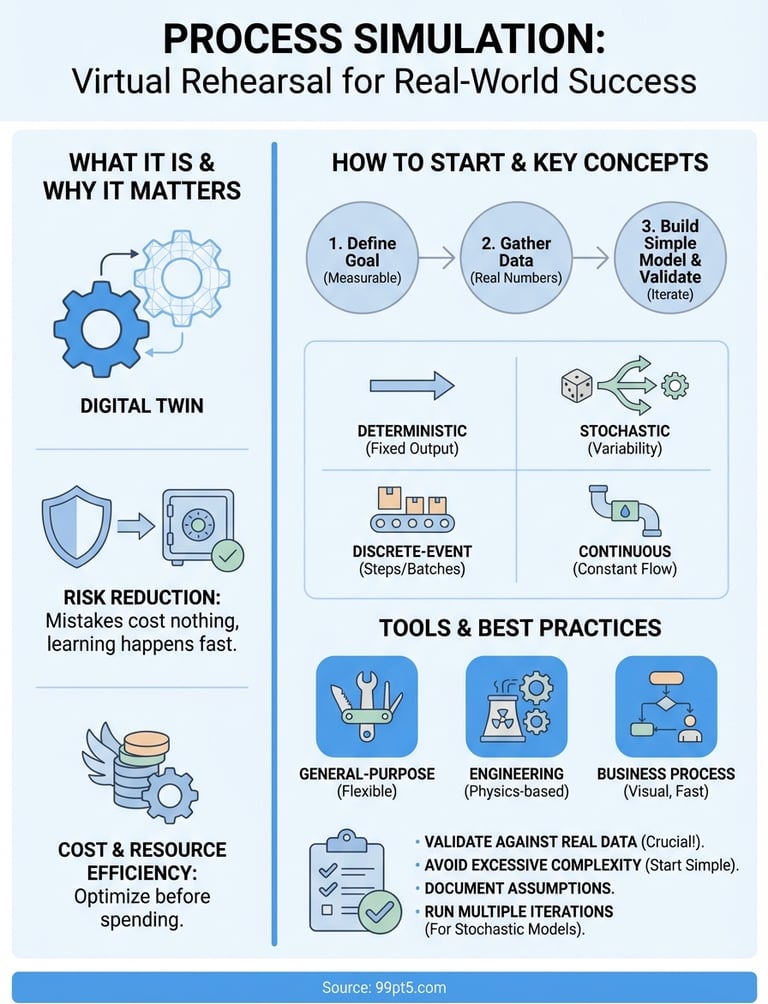
Process simulation gives you a safe testing ground where mistakes cost nothing and learning happens fast. Instead of implementing changes directly into your production line or business workflow and hoping they work, you can trial dozens of scenarios in the virtual environment and pick the winner. This approach cuts risk dramatically because you discover bottlenecks, capacity limits, and unintended consequences before they affect real operations. Understanding what is process simulation means recognizing that it's essentially a risk-mitigation tool that lets you be bold with innovation while staying conservative with actual implementation.
Risk reduction before implementation
You avoid expensive failures when you test changes in simulation first. Physical prototypes cost money to build, modify, and rebuild when they don't work as expected. Simulation models require only time and software, letting you iterate quickly without material waste or downtime. If you're redesigning a chemical reactor or rethinking your order fulfillment process, simulation shows you exactly where your design breaks before you commit resources.
Testing virtually means real-world deployment becomes a known quantity rather than an experiment.
Cost savings and resource efficiency
Simulation helps you optimize resource allocation before you purchase equipment or hire additional staff. You can test whether adding a third production shift solves your capacity problem or if the bottleneck actually sits upstream in your process. Operating costs drop when you identify the most efficient configuration during simulation rather than through costly trial-and-error in production. Energy consumption, material usage, and labor requirements all become variables you can tune for maximum efficiency before spending a dollar on real-world changes.
How to get started with process simulation
Starting with process simulation requires clear objectives and realistic scope. You don't need to model every detail of your operation in your first attempt. Instead, focus on a specific problem you want to solve or a single process segment you want to improve. The most successful first simulations tackle manageable questions like "what happens if we add one more station to this assembly line?" or "can we reduce batch processing time by 15% without adding equipment?" When you keep your initial project focused, you build confidence and learn the tools without drowning in complexity.
Define your specific goal first
Your simulation project needs a concrete question to answer before you touch any software. Vague goals like "optimize the process" or "make things better" waste time because you can't measure success. Strong goals sound like "reduce customer wait time from 8 minutes to 5 minutes" or "increase reactor yield from 87% to 92% while maintaining safety margins." Measurable targets give you a finish line and help you decide which process variables matter most. Understanding what is process simulation means recognizing it's a tool that answers specific questions rather than a magic solution that fixes everything at once.
Write down your goal and the key performance metrics you'll track. If you're simulating a business process, your metrics might include throughput, cycle time, or resource utilization. Engineering simulations typically focus on conversion rates, energy consumption, or product quality. These metrics become your simulation's output variables.
Gather your process data
You need real numbers from your actual process to build a model that produces useful results. Start collecting data on task durations, equipment capacities, failure rates, arrival patterns, and any other variables that affect your process flow. Historical records from your control systems, production logs, or business software provide the foundation for accurate simulation. Poor input data produces unreliable predictions no matter how sophisticated your model becomes.
Clean, accurate data turns simulation from guesswork into prediction.
Focus on collecting data for the specific process segment you're modeling rather than trying to document your entire operation. If you're simulating three workstations in your production line, you need detailed timing and capacity data for those three stations, not the entire factory. Quality beats quantity when you're starting out because validating your model against real-world results becomes much easier with a focused dataset.
Build your first simple model
Start with the simplest representation that still captures your process's essential behavior. Map out the basic flow showing inputs, activities, decision points, and outputs. Most simulation tools let you drag and drop elements to create this flow diagram visually. Resist the urge to add every possible detail in your first version because complexity makes troubleshooting harder and learning slower. A simple model that runs successfully teaches you more than a complex one that never works.
Run your initial model with estimated parameters just to see it execute, then gradually replace estimates with your real data. This incremental approach helps you spot where your understanding of the process differs from reality. Validate early and often by comparing simulation outputs against known results from your actual process before you start testing changes.
Key concepts and types of simulation
Process simulation splits into several distinct approaches, each suited to different problems and process characteristics. Understanding which type fits your situation saves you from building the wrong model or using inappropriate methods. The core distinction revolves around how you represent time and how you handle uncertainty in your model. Your choice between simulation types depends on whether your process flows continuously or moves in discrete steps, whether outcomes vary randomly or follow predictable patterns, and what level of detail you need to answer your specific question.
Deterministic versus stochastic models
Deterministic simulation assumes every input produces the exact same output every time you run it. When you model a chemical reaction at fixed temperature and pressure, the conversion rate stays constant. These models work well for processes where variability doesn't matter or when you want to understand the theoretical ideal performance. You get clean, repeatable results that make comparing scenarios straightforward.
Stochastic simulation incorporates randomness and probability to reflect real-world variability. Customer arrivals don't happen at perfect intervals, machines break down unpredictably, and task durations vary between workers. Your model generates different results each run because it samples from probability distributions rather than using fixed values. Running multiple iterations produces a range of possible outcomes with statistical confidence intervals rather than a single answer.
Random variation often matters more than average values when you're planning capacity or setting service levels.
Discrete-event versus continuous simulation
Discrete-event simulation models your process as a series of distinct events that happen at specific points in time. A part arrives at a workstation, processing begins, processing completes, the part moves to the next station. Time jumps from event to event rather than advancing smoothly. This approach fits manufacturing lines, service operations, and logistics where things move in batches or units through defined stages.
Continuous simulation represents processes where change happens constantly rather than in discrete steps. Chemical reactors, fluid dynamics, and thermal systems all involve variables that evolve smoothly over time. Your model uses differential equations to calculate how concentrations, temperatures, or flow rates change moment by moment. Engineering applications frequently require continuous models because physical processes don't wait for discrete events to happen.
Static versus dynamic analysis
Static simulation evaluates your process at a single point in time without considering how it got there or where it goes next. You might model steady-state operation of a distillation column where all flows and compositions remain constant. Static models answer questions about equilibrium conditions and capacity limits but can't tell you how long transitions take or how your process responds to disturbances.
Dynamic simulation tracks how your process changes over time from startup through normal operation to shutdown. When you're asking what is process simulation in the context of process control or transient behavior, you need dynamic models. These simulations show you response speeds, stability margins, and time-based performance metrics that static models miss completely. Control system design, batch processing, and any situation involving startup or shutdown sequences requires dynamic analysis.
Model fidelity and abstraction levels
High-fidelity models include maximum detail and complexity to produce the most accurate predictions possible. You might model individual molecules in a reactor or track every customer's path through your service process. These models take longer to build and run slower but provide precise answers when you need them.
Low-fidelity models strip away unnecessary detail to focus on key behaviors and relationships. Simplified models run faster, require less data, and help you understand fundamental dynamics without getting lost in complexity. Your first simulation should typically use lower fidelity until you validate the basic structure, then add detail only where it meaningfully improves your predictions.
Common tools and software
The simulation software market splits between general-purpose platforms that handle multiple simulation types and specialized tools built for specific industries or problem domains. Your choice depends on whether you need flexibility across different project types or deep capabilities within a narrow application area. Entry-level users often start with simpler business process tools before graduating to engineering-grade simulators, but your problem determines the appropriate starting point more than your experience level does. When considering what is process simulation software can accomplish, you'll find that modern tools range from visual drag-and-drop interfaces requiring no programming to advanced environments where you write custom code for complex models.
General-purpose simulation platforms
Tools like MATLAB Simulink and AnyLogic give you the flexibility to build discrete-event, continuous, or agent-based models within a single environment. These platforms support hybrid approaches where you combine different simulation methods in one model, making them valuable when your process includes both continuous chemical reactions and discrete material handling steps. You'll find extensive libraries of pre-built components, statistical analysis features, and visualization options that speed up model development. The learning curve runs steeper than specialized tools because you gain capability at the cost of simplicity.
Flexible platforms let you grow your modeling skills across different problem types without switching software.
Specialized engineering simulators
Engineering simulation demands tools that understand thermodynamics, fluid mechanics, and chemical kinetics at a fundamental level. Aspen Plus dominates chemical process simulation with built-in property databases, rigorous unit operation models, and industry-standard calculation methods. COMSOL Multiphysics handles finite element analysis for complex geometries and coupled physics problems that continuous simulators struggle with. These specialized platforms cost more and require deeper technical knowledge but deliver accuracy that generic tools can't match for engineering applications. Your reactor design or separation process model produces reliable scale-up predictions because the physics equations are already validated.
Business process simulation software
Business-focused tools prioritize ease of use and rapid deployment over physical accuracy. ProcessMaker, Bizagi, and similar platforms let you map workflows visually, simulate resource allocation scenarios, and identify bottlenecks without writing equations or code. You drag process steps onto a canvas, define task durations and resource requirements, then run simulations to see throughput and cycle times under different staffing levels or demand patterns. These tools integrate with business intelligence systems to pull real operational data directly into your models, making validation faster and results more actionable for management decisions.
Python libraries like SimPy offer free alternatives when you're comfortable writing code and want complete control over your model logic. You sacrifice visual interfaces and pre-built components but gain unlimited flexibility to implement exactly the behavior you need without software licensing costs.
Examples in business and engineering
Real-world applications show how simulation solves specific problems across different industries and scales. These examples demonstrate the practical value of building virtual models before making costly physical changes. You'll see that what is process simulation delivers depends entirely on your domain, with business applications focusing on resource allocation and service levels while engineering examples target physical performance and safety margins. The following cases illustrate concrete outcomes that companies achieved through simulation rather than trial-and-error implementation.
Manufacturing process optimization
A automotive parts manufacturer used discrete-event simulation to redesign their assembly line layout after chronic bottlenecks limited output to 240 units per shift. They built a model that tracked each component through fifteen workstations, incorporating actual cycle times and machine reliability data collected over three months. The simulation revealed that their bottleneck wasn't at the suspected welding station but rather at an upstream inspection point where parts queued unpredictably. Testing various configurations virtually, they found that adding a single inspector and relocating one workstation increased throughput to 310 units per shift without purchasing new equipment.
Simulation also helped them evaluate staffing strategies for different demand scenarios. By running the model with varying arrival rates and shift patterns, they determined exactly when to schedule overtime versus accepting delayed orders. This analysis prevented them from hiring six additional workers who would have sat idle during normal production periods while still maintaining delivery commitments during peak demand.
Service operations and customer flow
A hospital emergency department tackled excessive wait times by simulating patient flow from arrival through discharge. Their model incorporated different patient acuity levels, treatment protocols, and resource availability for doctors, nurses, and diagnostic equipment. Running 500 iterations with stochastic patient arrivals revealed that their triage process worked efficiently but patients waited unnecessarily for bed assignments after initial assessment.
Testing multiple staffing patterns virtually identified the most cost-effective solution without disrupting actual patient care.
The simulation showed that adding two beds and one nurse during evening shifts reduced average wait times by 43 minutes while hiring additional doctors yielded minimal improvement. This insight saved $180,000 annually compared to their original plan of expanding medical staff. They implemented the bed expansion first, validated the predicted improvement against real results, then used the model to optimize scheduling across different weekday and weekend patterns.
Chemical plant design and scale-up
A specialty chemicals company used continuous simulation to scale up a new reactor design from laboratory bench to commercial production. Their Aspen Plus model incorporated detailed kinetics, heat transfer calculations, and thermodynamic properties to predict performance at 100x the pilot scale. The simulation identified potential temperature control issues that would have caused runaway reactions at commercial flow rates, leading them to modify the cooling system design before fabricating expensive equipment.
They also used the model to optimize operating conditions for maximum yield while maintaining safety margins. By testing thousands of temperature, pressure, and residence time combinations virtually, they found an operating window that delivered 6% higher conversion than their initial design assumptions suggested. This improvement translated to $2.3 million additional annual revenue from the same capital investment.
Pitfalls to avoid and best practices
Common mistakes derail simulation projects more often than technical limitations do. You waste time and money when you build the wrong model or trust results without proper validation. Understanding what is process simulation means recognizing that your virtual model only produces useful insights when you avoid predictable errors and follow proven methods that separate successful projects from abandoned ones. The difference between helpful simulation and expensive distraction often comes down to discipline in your approach rather than sophisticated software features.
Starting with excessive complexity
Your first model should capture essential behavior without attempting to represent every detail of your real process. Beginning with a complex model creates multiple problems: longer development time, harder debugging, more data requirements, and validation that becomes nearly impossible. Strip away variables that don't significantly affect the question you're answering because each added element multiplies your chances of introducing errors while often contributing minimal accuracy improvement.
Build your model incrementally by starting simple and adding complexity only when validation shows you need it. Test each addition separately so you know exactly what impact new elements have on your results. This approach lets you identify which details matter and which ones waste computational resources without improving predictions.
Ignoring model validation
Running your simulation without comparing outputs to real-world data produces numbers that look authoritative but may be completely wrong. Validation means checking that your model reproduces known results from your actual process before you trust it to predict changes. Collect performance data from your current operation and run your model with identical conditions to see if simulated outcomes match reality within acceptable tolerance.
A validated model earns trust through demonstrated accuracy, not complexity or impressive visualizations.
When your simulation disagrees with reality, you've discovered either bad input data or incorrect model logic. Fix these problems before testing scenarios because predictions from an unvalidated model mislead rather than inform your decisions.
Best practices for reliable results
Document your assumptions and data sources as you build your model so you can explain results later and maintain the model over time. Running multiple iterations with stochastic models gives you confidence intervals and statistical validation that single runs can't provide. Plan for 30 to 100 replications minimum when randomness affects your process.
Save intermediate model versions frequently so you can roll back changes that break functionality or produce unexpected behavior. Regular saves also let you compare results across development stages to understand how refinements affect your predictions.
Wrapping up
Process simulation transforms how you design, optimize, and improve both business workflows and engineering systems by letting you test changes virtually before implementing them in reality. You now understand what is process simulation delivers across different domains, from discrete-event models that optimize service operations to continuous simulations that predict chemical plant performance. The key to success lies in starting simple, validating your model against real data, and adding complexity only when needed to answer specific questions.
Your next step depends on your application. Business process improvements typically start with accessible tools that map workflows visually, while engineering projects often require specialized platforms with validated physics models. Companies like 99pt5 demonstrate how simulation expertise translates into superior equipment design, using advanced tools to optimize biogas processing systems before fabrication. Apply these principles to your own processes and you'll catch problems early while discovering improvements that would remain hidden without virtual testing.