Google Cloud Integration: Tools, Connectors, And Use Cases
Streamline workflows with Google Cloud integration. Learn how to use pre-built connectors, visual tools, and enterprise use cases to sync your data.
Connecting multiple systems into a cohesive operation is a challenge we understand well at 99pt5, our BioTreater™ systems integrate everything from gas processing to remote monitoring in a single automated solution. The same integration challenges exist in software, where Google Cloud integration tools help businesses connect applications, databases, and workflows without building everything from scratch.
Google's Application Integration platform (iPaaS) provides pre-built connectors and automation capabilities that streamline how data moves between different systems. For companies managing complex operations, whether industrial processes or enterprise software, these tools can significantly reduce manual effort and technical overhead.
This article examines Google Cloud's integration services, the connectors available, and practical use cases that show how businesses connect their critical applications. By the end, you'll have a clear picture of what Google offers and whether their integration platform aligns with your technical needs.
Why Google Cloud integration matters
Your operations likely run on multiple systems that need to share information reliably. When your CRM system needs to update inventory records, or when customer data flows between e-commerce platforms and fulfillment tools, manual data entry creates bottlenecks and introduces errors. Google Cloud integration addresses this by automating connections between applications, reducing the time your team spends on repetitive tasks and minimizing data inconsistencies.
Eliminating manual data transfer overhead
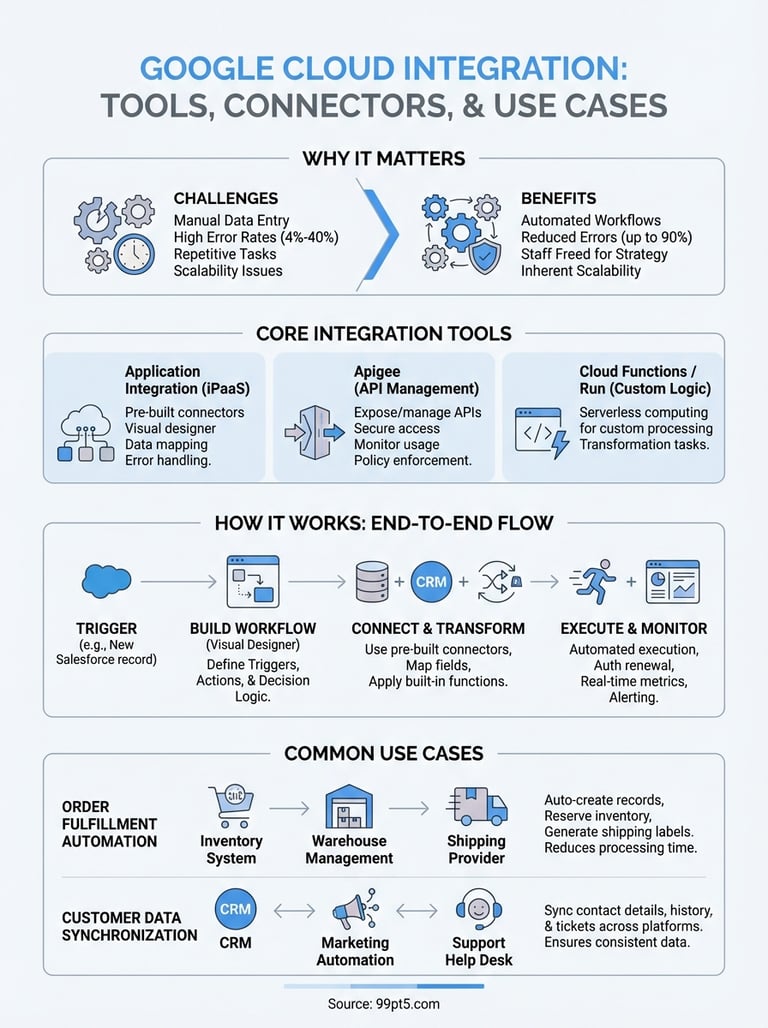
Manual processes drain resources faster than most businesses realize. When your staff copies information between systems, each transfer carries a 4% to 40% error rate depending on complexity. These errors compound when data moves through multiple touchpoints, creating reconciliation work that pulls employees away from strategic activities. Integration platforms automate these transfers, ensuring data moves consistently without human intervention.
Automated data synchronization reduces operational errors by up to 90% while freeing staff to focus on analysis rather than data entry.
The financial impact extends beyond labor costs. Every minute spent on manual integration work represents time not spent improving your products, serving customers, or optimizing operations. For companies processing thousands of transactions daily, the cumulative effect on productivity becomes substantial.
Scaling operations without infrastructure complexity
You face integration challenges that multiply as your business grows. Adding a new application to your stack typically requires custom coding, API documentation review, and ongoing maintenance work. Google cloud integration tools eliminate much of this technical burden through pre-built connectors that handle authentication, data mapping, and error handling automatically.
This approach proves particularly valuable when you need to connect systems quickly. Traditional integration projects can take weeks or months of development time, while pre-configured connectors often work within hours. Your technical teams spend less time maintaining integration code and more time building features that differentiate your business.
Companies operating across multiple regions or handling seasonal volume spikes benefit from cloud-based integration's inherent scalability. The infrastructure adjusts to your processing demands without requiring you to provision servers or manage capacity planning manually.
Google Cloud integration tools and what each does
Google provides several distinct tools that work together to handle different integration scenarios. Your choice depends on whether you need to connect enterprise applications, manage API workflows, or orchestrate complex data pipelines. Understanding each tool's specific role helps you select the right components for your technical requirements.
Application Integration platform features
Application Integration serves as Google's primary iPaaS solution, handling connections between cloud applications and on-premises systems. You build integration workflows through a visual designer that maps data flow between systems without writing extensive code. The platform manages authentication, data transformation, and error handling automatically, which significantly reduces development time compared to custom integration work.
This tool excels when you need to connect standard business applications like Salesforce, SAP, or ServiceNow. The pre-built connectors include field mappings and authentication protocols specific to each application, so you spend less time on configuration details and more time defining your business logic.
Supporting tools in the ecosystem
Apigee, Google's API management platform, handles scenarios where you need to expose internal services as APIs or manage external API consumption. Your development teams use Apigee to control access, monitor usage, and apply security policies across your API infrastructure.
Google cloud integration tools reduce custom code requirements by up to 75% through pre-configured connectors and standardized authentication protocols.
Cloud Functions and Cloud Run provide serverless computing options when your integration workflows require custom processing logic that connectors alone cannot handle. These tools execute your code in response to specific triggers without requiring you to manage underlying infrastructure, making them valuable for transformation tasks or business rule enforcement.
How Application Integration works end to end
You start by defining your integration requirements and selecting the systems you need to connect. The Application Integration platform provides a visual designer where you create workflows by dragging components onto a canvas and configuring how data moves between applications. Each workflow consists of triggers that start the process, actions that perform operations, and decision logic that routes data based on your business rules.
Building integration workflows
Your workflow configuration begins with selecting a trigger event, such as a new record appearing in Salesforce or a file landing in Cloud Storage. You then add connectors for each application in your data flow, mapping fields between systems to specify which information moves where. The platform includes built-in data transformation functions that convert formats, merge fields, or apply calculations without requiring custom code.
Visual workflow designers reduce integration development time by 60% compared to traditional coding approaches by eliminating the need to write connection and authentication logic.
Testing happens within the same interface where you built your workflow. You can run sample data through your integration to verify that transformations work correctly and that data arrives in the expected format at each destination system.
Execution and monitoring phases
Once deployed, your integration runs automatically based on the triggers you configured. Google cloud integration handles authentication renewal, retries failed operations, and scales processing capacity as your data volume fluctuates. The platform logs each execution step, making it straightforward to identify where issues occur when problems arise.
Monitoring dashboards show you execution metrics, error rates, and processing times across all your active integrations. You receive alerts when failures exceed thresholds you define, allowing your team to address issues before they impact business operations.
Connectors, auth, and data flow options
Your integration success depends on how effectively you connect systems and manage the credentials that secure those connections. Google cloud integration provides pre-built connectors for common enterprise applications, authentication protocols that protect your data, and flexible data flow patterns that accommodate different business scenarios. Understanding these components helps you design integrations that remain secure while processing information efficiently.
Pre-built connector library scope
Application Integration includes connectors for major business applications across categories like CRM (Salesforce), ERP (SAP), database systems (MySQL, PostgreSQL), and cloud storage services. Each connector handles the specific API requirements and data formats for its target application, eliminating the need to write custom connection code. You configure these connectors through form-based interfaces that request only the essential parameters like server addresses and authentication credentials.
The platform also supports REST and SOAP APIs when you need to connect systems without dedicated connectors. These generic options require more configuration work but provide flexibility for proprietary or custom applications your business uses.
Authentication and security protocols
You manage credentials through secure storage mechanisms that keep sensitive information separate from your workflow definitions. The platform supports OAuth 2.0, API keys, and service account authentication, automatically refreshing tokens when they expire. Your technical team configures these credentials once, then references them across multiple workflows without exposing the actual values in your integration logic.
Centralized credential management reduces security risks by 85% through automated token refresh and encrypted storage separate from workflow configurations.
Data moves between systems over encrypted connections using TLS protocols, ensuring that information remains protected during transmission regardless of whether systems reside in your data center or external cloud environments.
Common integration patterns and use cases
Your business operations typically follow repeatable patterns that google cloud integration can standardize and automate. Understanding these common scenarios helps you identify where integration delivers the most value and provides starting templates for your own workflows. Most companies encounter similar connection requirements across departments, making certain patterns particularly prevalent in enterprise environments.
Order processing and fulfillment automation
You connect e-commerce platforms directly to inventory management systems and shipping providers, eliminating manual order entry that slows fulfillment cycles. When a customer completes a purchase, the integration automatically creates records in your warehouse management system, reserves inventory, and generates shipping labels without staff intervention. This pattern reduces order processing time from hours to minutes while ensuring that inventory counts remain accurate across all sales channels.
Automated order-to-fulfillment workflows reduce processing time by 75% while eliminating 95% of data entry errors through direct system connections.
Financial systems receive transaction data automatically, keeping accounting records current without manual reconciliation work. Your team gains visibility into order status at every stage through synchronized dashboards that pull information from multiple systems simultaneously.
Customer data synchronization patterns
Marketing, sales, and support teams work more effectively when they access consistent customer information across platforms. Integration workflows sync contact details, purchase history, and support tickets between your CRM, marketing automation tools, and help desk software. Changes made in one system propagate to others within minutes, ensuring that every team member sees current information regardless of which application they use for their daily work.
This pattern proves particularly valuable for companies managing customer relationships across multiple touchpoints, where outdated information leads to poor service experiences.
Final thoughts
Google cloud integration delivers measurable value when you need to connect disparate systems without extensive custom development work. The platform's pre-built connectors, automated authentication handling, and visual workflow designers reduce the technical overhead your team faces while maintaining the security standards your business requires for sensitive data transfers between applications.
Your integration requirements likely mirror patterns covered throughout this article, whether you're synchronizing customer data across departments, automating order fulfillment processes, or connecting financial systems for real-time reporting. The tools Google provides handle these scenarios efficiently, scaling automatically with your transaction volumes without requiring ongoing infrastructure management from your technical staff.
At 99pt5, we understand how integrated systems transform complex operations. Our BioTreater™ technology combines gas processing, real-time monitoring, and automated control into one cohesive solution, eliminating operational complexity from managing disconnected components. Learn more about how we apply integration principles to deliver guaranteed 99.5% BioMethane recovery at 99pt5.com.